
Phantom Blade Zero Player Count: Steam Activity and Community
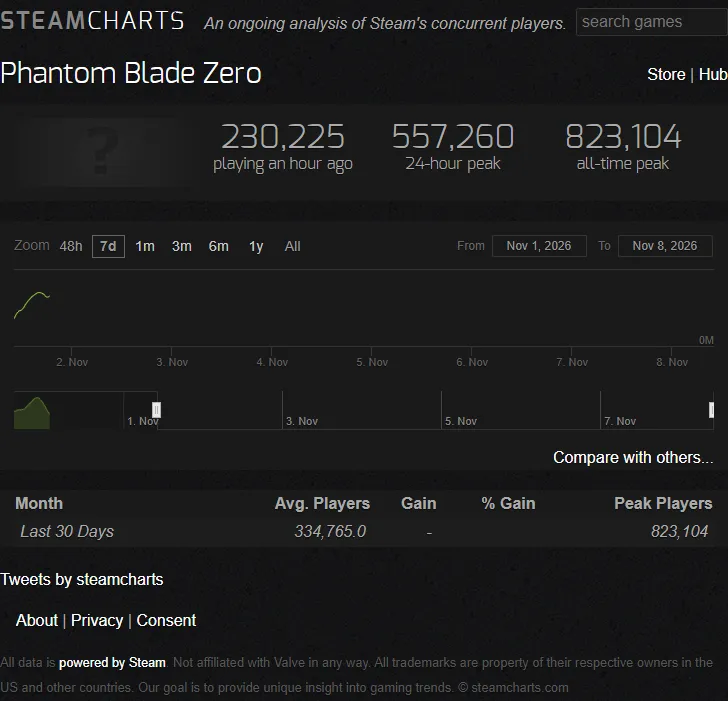
Steam’s player-count API returned 427,650 concurrent players for Phantom Blade Zero on November 8, 2026 at approximately 07:28 UTC. That is a timestamped reading for Steam app 4115450. Use the observation to understand Steam activity at that moment, then open a current tracker for a newer value. For community help, inspect recent discussion threads separately: people playing and people answering a particular question are different groups. [1]
Latest recorded count and earlier comparison
| Observation | Reading | Time or window | Meaning |
|---|---|---|---|
| Steam API current players | 427,650 | November 8, 2026, about 07:28 UTC | Users concurrently playing through Steam |
| Earlier Steam Charts current players | 147,554 | November 8, 2026, 01:02 UTC | A different moment in the same day |
| Earlier chart’s 24-hour peak | 557,260 | Its displayed rolling window | Highest simultaneous count in that window |
| Earlier chart’s all-time peak | 823,104 | Tracker’s recorded history | Highest point recorded by that tracker |
The API and chart snapshots have different timestamps. The later current count should not be substituted into the earlier chart’s peak window, and the difference between two observations does not establish a weekly trend. Keep the source, field and time together when quoting any reading. [1] [2]
What each player-count figure can answer
Current concurrency answers how many Steam users were playing simultaneously at the update. A daily peak answers the busiest observed moment in a stated window. A multi-day average or series of matching daily peaks is more useful for comparing activity over time. Total ownership, copies sold and daily unique users are different measures that cannot be calculated from the current count alone.
PS5 players are outside this Steam reading. An all-platform total would require compatible information from each platform, measured over the same period. The official platform pages confirm PC and PS5 availability, but they do not supply a synchronized combined audience total. [3] [4]
For a useful comparison, choose one tracker and one field, record the update time and compare equivalent windows. A single low point overnight and a busy weekend peak answer different questions. When two sites disagree, inspect their timestamps and labels before interpreting the difference as a reporting problem.
Where to check activity yourself
| Your question | Destination | What to inspect |
|---|---|---|
| How many Steam users are playing now? | Steam Charts | Current field and update time |
| What are the recorded Steam peaks? | SteamDB app charts | Peak label and time window |
| Are players discussing my quest? | Steam discussions | Matching objective and recent replies |
| What has the developer announced? | Steam news | Dated posts and patch notes |
| Where are player guides and screenshots? | Steam Community hub | The relevant content section |
These destinations serve different decisions. Use a chart for activity history, a dated news post for an announced change and an actual discussion thread for whether somebody has addressed your problem. A large current count gives no guarantee about the quality or speed of a specific reply.
Getting useful quest or technical help
For a route question, include the journal’s exact Tale name, nearest bell and whether you are on the first visit or a later changed-region revisit. That prevents a reply aimed at a different stage. Put late-game details in spoiler formatting and keep the thread title focused on the objective.
For a technical problem, include platform, game version, the symptom and what you already tried. On PC, add the relevant CPU, graphics card and settings. Compare a suggested fix with your own conditions before applying it. A crash report demonstrates one player’s experience; a matching symptom and version make it more useful to someone else.
Does the count affect whether you can enjoy the game?
Phantom Blade Zero is a single-player campaign, so you do not need a populated matchmaking queue to progress. Choose whether to play based on its combat, difficulty, hardware requirements and the time you want to spend. Community activity matters when you want discussion, shared discoveries or troubleshooting. [3] [4]
The recorded reading demonstrates substantial Steam activity at its timestamp. Whether a particular community is useful to you depends on current, relevant conversations. Open the destination matching your purpose and evaluate the recent material there; the concurrency snapshot supplies context for that decision rather than a promise about future support.
Related guides
Sources
Was this helpful?
Thanks for the feedback!