
Phantom Blade Zero on Steam and PS5: Buying Guide
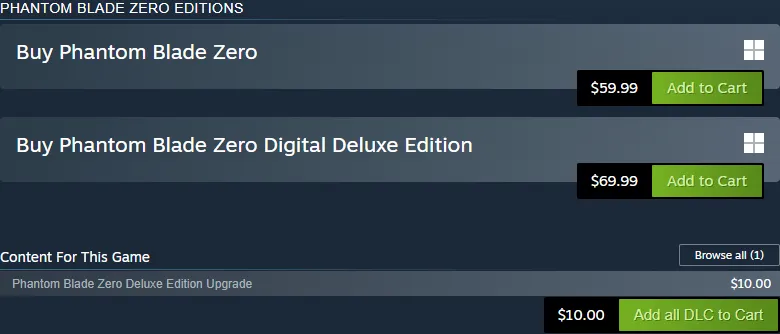
Phantom Blade Zero is available on Steam for Windows and on PlayStation 5. For most first-time buyers, Standard is the straightforward choice: it includes the game, while Digital Deluxe adds outfits, an art book and a soundtrack. The US stores checked on November 8, 2026 listed Standard at $59.99 and Digital Deluxe at $69.99. Choose your platform first, then decide whether those extras justify the $10 difference. [1] [2]
Official buying links and edition prices
| Purchase | Steam for Windows | PlayStation 5 | Choose it when |
|---|---|---|---|
| Standard | $59.99 | $59.99 | You want the full base game |
| Digital Deluxe | $69.99 | $69.99 | You also want the listed outfits and digital media |
| Deluxe upgrade or pack | $10.00 | $10.00 | You already own the base game on that platform |
Open the Steam base-game listing or the PlayStation edition selector. These are US list prices; your signed-in regional checkout determines the amount you pay. The upgrade is an add-on, so an upgrade-only purchase requires the base game. Both stores identify the Deluxe extras as Wulin Legend, Blood-Steel Form, a digital art book and a digital soundtrack. [1] [2]
Start with Standard if your interest is the campaign and combat. Buy Deluxe if you already want the outfits or accompanying media. Buying Standard and the upgrade later costs the same $69.99 at these recorded list prices, which gives an undecided buyer a practical way to defer the extras. Discounts and bundles can change that calculation, so compare the final totals before selecting a package.
Choose between your PC and PS5
| Your situation | Practical choice | What to check |
|---|---|---|
| Your PC meets the published target and is your usual setup | Steam | Graphics card, CPU, SSD space and target resolution |
| You already own a PS5 and want a console setup | PS5 | Account region, digital versus physical package and available storage |
| You own both and performance decides the purchase | Compare current tests for your hardware and console model | Patch version, graphics preset, upscaling and frame-time consistency |
| You want to play cooperatively with a friend | Reconsider that requirement | This is a single-player game |
The Steam requirements provide useful hardware targets. They do not establish that one platform runs better than the other. A comparison matters only when the tested version, settings and hardware match the machine you intend to use. PS5’s fixed hardware simplifies the choice for a console owner; the PC decision depends on the components below. Both official listings describe the game as single-player. [1] [2]
PC requirements before you buy on Steam
| Component | Minimum target | Recommended target |
|---|---|---|
| CPU | Core i7-8700K or Ryzen 5 3600 | Core i5-10600K or Ryzen 5 5600X |
| GPU | GTX 1660 6GB or RX 5500 XT 8GB | RTX 3060 Ti 8GB or RX 6700 XT 12GB |
| RAM | 16GB | 16GB |
| Storage | 145GB SSD | 145GB SSD |
| Display target | 1080p, 30 FPS with upscaling | 1440p, 60 FPS with upscaling |
The listing also specifies 64-bit Windows 10 or 11 and DirectX 12. Its resolution and frame-rate figures include upscaling. Compare the CPU and graphics card separately: having enough RAM does not compensate for a graphics card below the listed minimum. Leave additional room for installation and updates, and read the installation prompt before starting a large download. [1] [3]
If your PC falls below the minimum and you already own a PS5, the console purchase avoids that specific hardware shortfall. If you meet the recommended target, Steam is a reasonable option for your existing PC setup; actual performance still depends on the selected settings and game version.
Release, demo and other-platform questions
PlayStation lists October 29, 2026 as its release date; Steam can display October 28 in an American regional view. Both current pages offer a released game. Use their purchase controls rather than following an old pre-order countdown. The PlayStation FAQ states that the game is available on PC and PS5, excludes PS4, and reports no available demo at the check above. [1] [2]
For Xbox, Microsoft Store, another PC storefront or a boxed collector’s package, the verified destinations here do not settle current availability. Check the publisher’s regional store links and the actual product listing before paying. A reseller’s platform label or an old announcement cannot confirm a playable current release. That availability question remains separate from choosing between the two verified digital stores.
Final purchase check
Confirm the platform, account region, base-game ownership and edition contents in that order. For a physical offer, check whether it includes a disc, a download code or merchandise, and whether the seller has stock. For a digital offer, review the regional total and applicable refund conditions. Once those details match your setup, Standard is the default recommendation; Deluxe is the choice for its named extras.
Related guides
Sources
Was this helpful?
Thanks for the feedback!